



You can check your website’s SEO score using tools such as SEOptimer, SEO Site Checkup, Semrush Site Audit, or Ahrefs Site Audit. Enter your website URL, run the analysis, review the score and reported issues, and fix the problems that matter most. Since each tool uses its own scoring method, combine your audit results with Google Search Console data to understand your website’s actual search performance.
What Is a Website SEO Score?
A website SEO score is a tool-generated measure of your website’s SEO health based on specific checks, such as technical errors, page optimization, crawlability, and internal links. It helps you identify potential problems, but it is not an official Google ranking score.
Health Score is based on the proportion of crawled internal URLs without errors. Semrush considers errors and warnings identified during its website audit.
This means the same website can receive different scores across tools without either report necessarily being incorrect.
Your SEO score is useful for identifying problems, but it should not be your only performance measure. Also consider whether important pages are indexed, whether your website attracts relevant organic traffic, and whether visitors complete meaningful actions.
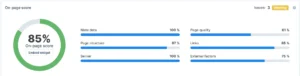
Image showing real website score on SEO ability SEO checker:
How to Check Your Website’s SEO Score in 5 Steps
You can check your website’s SEO score in five steps: choose a scoring tool, enter your URL, review the result, investigate flagged issues, and prioritize fixes before running another audit.
Step 1: choose an SEO scoring tool
Choose a tool that provides an actual SEO score and explains the issues behind it. Some checkers analyze a single page, while website audit platforms can crawl multiple URLs and evaluate broader technical problems.
Here are a few options to consider:
- SEOptimer: Provides an SEO audit report and recommendations for improving a website.
- SEO Site Checkup: Offers website checks covering areas such as on-page SEO and technical issues.
- Seobility SEO Checker: Analyzes individual web pages and provides an SEO score, highlighting issues related to metadata, content, links, and technical optimization.
- Semrush Site Audit: Crawls your website to identify technical SEO issues and provides a Site Health score with actionable recommendations.
- Ahrefs Site Audit: Crawls website pages to identify technical and on-page SEO issues and provides a Health Score based on the errors found.
Check each platform’s current pricing and usage limits before starting. Some tools restrict the number of free checks, crawled pages, or available report features.
If you only need a quick assessment, SEOptimer, SEO Site Checkup, and Seobility SEO Checker may be sufficient.
For a larger website with hundreds of pages, a dedicated audit platform such as Semrush Site Audit and Ahrefs Site Audit will provide a more comprehensive view.
Before choosing a tool, confirm whether it provides an overall SEO score or evaluates only specific areas of your website.
Step 2: enter your website url
Enter your website’s domain or the page URL into the selected SEO checker and start the analysis. Depending on the tool, you may need to create an account, verify website ownership, or configure the crawl.
If you want to assess your entire website, confirm that the tool can examine more than just your homepage. A homepage may be well optimized while important product pages, service pages, or blog posts contain technical issues.
For a full audit, review the crawl settings, page limits, and access restrictions. Make sure the tool can access the sections of your website you want to evaluate.
If you are checking a specific landing page, a page-level assessment can still be useful. Just remember that its score represents the page being tested, not necessarily the health of your entire website.
Step 3: review the overall score
Review the overall SEO score to understand the condition of the pages examined by the tool. Then look at the score’s definition and the categories contributing to it.
Do not compare scores from different platforms as if they use the same scale. A score of 85 from one tool may not mean the same thing as 85 from another.
Do not assume that a high score means your website will rank well. An audit score does not directly measure search demand, content relevance, competitor strength, or the business value of your organic traffic.
Use the overall score as a starting point, then investigate the individual findings to understand what needs attention.
Step 4: examine the flagged issues
Review the audit report to understand which issues are affecting your website and which URLs are involved. Most tools organize their findings into categories such as errors, warnings, and recommendations.
Pay particular attention to these areas:
- Technical SEO: Broken links, redirect problems, crawlability restrictions, and indexing issues.
- On-page SEO: Missing title tags, duplicate metadata, unclear headings, and poorly optimized pages.
- Internal linking: Important pages that receive too few relevant internal links.
- Page performance: Slow-loading pages or poor Core Web Vitals may indicate areas that need improvement.
- Content quality: Pages that need more useful information, clearer answers, or better alignment with search intent.
Not every warning deserves immediate attention. For example, a problem affecting an important service page may matter more than a minor metadata issue on an outdated page that receives little traffic.
Across 500+ website audits at Crawl Vision, we’ve found that 80% of websites have technical SEO issues that can affect crawling, indexing, and organic search performance. Fixing these issues is often an important first step toward improving a website’s SEO.
Step 5: prioritize fixes and retest
Fix the most consequential issues first, then run the audit again to check whether the problems have been resolved. Prioritize issues that prevent important pages from being crawled or indexed, affect many valuable URLs, or create significant barriers for visitors.
A practical order is:
- Resolve critical crawling, indexing, and server errors.
- Fix broken internal links and problematic redirects.
- Improve missing or poorly written titles, headings, and metadata.
- Address relevant page performance problems.
- Review lower-priority recommendations and opportunities.
After making changes, rerun the audit using comparable settings. Check whether the affected URLs now pass the relevant checks instead of focusing exclusively on the overall score.
Also monitor Google Search Console for changes in clicks, impressions, click-through rate, and average position. These metrics provide a different perspective on how your website performs in Google Search. Improvements in an audit score alone do not guarantee ranking gains.
Which Tools Can You Use to Check Your Website’s SEO Score?
The best website SEO score checker depends on whether you need a quick assessment of one page or a detailed audit of multiple pages. Compare tools based on the score they provide, the issues they evaluate, and their free usage limits.
| Tool | What it measures | Best use |
| SEOptimer | SEO audit score and optimization recommendations | Quick website assessments |
| SEO Site Checkup | SEO checks and technical or on-page issues | Identifying common optimization problems |
| Semrush Site Audit | Site Health score, errors, and warnings | Detailed website audits |
| Ahrefs Site Audit | Health Score and technical SEO issues | Crawling and diagnosing website problems |
| Seobility SEO Checker | Analyse individual SEO pages | Meta data, links, page structure, technical optimization |
Free access, registration requirements, crawl limits, and available features vary by platform. Verify current plan details before choosing a tool.
Google Search Console and PageSpeed Insights are also valuable, but they serve a different purpose.
Search Console provides Google Search performance and indexing information, while PageSpeed Insights evaluates page performance and Core Web Vitals. Neither provides one universal, all-in-one website SEO score.
What Is a Good SEO Score for a Website?
A good SEO score depends on the tool’s scoring system, so there is no universal threshold that guarantees strong Google rankings. Follow the platform’s own guidelines and investigate important issues even when your overall score looks good.
For example, Ahrefs classifies Health Scores from 91 to 100 as excellent. That classification applies to its own audit metric, not to Google’s assessment of your website.
A website with a high score may still have an important landing page that is not indexed. Another website with a lower score may have relatively minor warnings that do not significantly affect its most valuable pages.
Instead of chasing a perfect score, focus on resolving significant errors, keeping important pages accessible, improving content relevance, and monitoring organic search performance.
How to Improve Your Website’s SEO Score
You can improve your website’s SEO score by fixing the specific issues identified in your audit, improving important pages, and making your website easier for search engines and visitors to navigate.
Start with these areas:
- Technical SEO: Check robots.txt directives, indexing settings, redirects, XML sitemaps, and server errors.
- On-page optimization: Write descriptive titles and meta descriptions, use clear headings, and align content with search intent.
- Internal linking: Connect related pages and ensure important URLs are easy to discover.
- Content quality: Update outdated information, answer relevant questions, and provide useful details that match what visitors need.
- Page experience: Investigate slow pages, mobile usability, and Core Web Vitals where performance issues exist.
You do not need to fix every recommendation at once. Work through the highest-impact issues, verify the changes, and measure whether they improve the website’s technical condition and search performance.
Google’s SEO Starter Guide is a useful reference for understanding how search engines discover, crawl, and interpret website content.
Conclusion
Checking your website’s SEO score is a practical way to identify problems that may affect search visibility. However, the score is only a starting point, not a complete measure of SEO success.
Use an audit tool to identify issues, prioritize fixes based on their impact, and retest your website after making changes. Combine audit findings with Google Search Console and PageSpeed Insights to understand both your website’s technical condition and its actual search performance.
The goal is not simply to achieve a higher number. It is to build a website that search engines can discover and understand, while helping visitors find the information they need.

