


To optimize your website for local search, target relevant local keywords, optimize your homepage and location pages, maintain consistent business information, add LocalBusiness schema, strengthen your Google Business Profile, earn genuine reviews, and track local search performance.
Why Your Website Needs Local Search Optimization
Your website helps search engines understand what your business offers, where you operate, and which local searches are relevant to your business.
Local search optimization is important because customers often search for businesses with location-based intent, such as “dentist in Chicago,” “SEO agency near me,” or “best restaurant in Boston.”
Google says local results are primarily influenced by relevance, distance, and prominence. Complete business information helps Google understand relevance, while factors such as links and reviews can contribute to prominence.
Your website also provides information that can be used across Google’s local ecosystem. Google states that it can use publicly available information from a business’s official website when compiling local listings.
That makes website optimization an important part of a broader local SEO strategy.
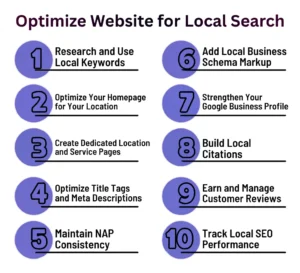
How to Optimize Your Website for Local Searches: 10 Proven Strategies
These practical strategies can help your website improve local visibility, reach nearby customers, and strengthen your overall local SEO performance.
1. Research and Use Local Keywords
Start by identifying the searches potential customers use when looking for your products or services in a specific area.
Useful keyword patterns include:
- Service + city
- Product + city
- Service + neighborhood
- “near me” searches
- Location-specific questions
Use local keywords where they genuinely describe the page, including headings, body copy, URLs, image alt text, and internal links. Avoid repeating a city name unnaturally throughout the page.
2. Optimize Your Homepage for Your Location
Your homepage should clearly communicate what you do and where you serve customers. Include relevant location information in natural places such as:
- Page title and main heading
- Introduction or service overview
- Contact information
- Business address, where applicable
- Areas served
- Links to important location pages
The goal is not to add more location keywords. It is to make your business’s geographic relevance easy for users and search engines to understand.
3. Create Dedicated Location and Service Pages
Create dedicated pages when you genuinely serve multiple locations or have distinct services that deserve separate coverage.
For example:
/services/seo/
/locations/chicago/
/locations/los angeles/
Each location page should provide useful information about that specific area rather than changing only the city name on an existing page.
Include details such as:
- Services available in the area
- Local customer questions
- Service coverage
- Relevant business information
- Location-specific examples or experience
Avoid producing large numbers of nearly identical location pages simply to capture geographic keywords. Each page should provide a clear reason for users to visit it.
4. Optimize Title Tags and Meta Descriptions
Write title tags and meta descriptions that clearly communicate the page’s service and local relevance.
For example:
Title: SEO Services in Mohali | Crawl Vision
Meta description: Explore SEO services in Mohali focused on improving organic visibility, ai visibility, website performance, and qualified search traffic.
Keep them accurate and specific. Do not fill titles with multiple city names or repeat keywords unnecessarily.
5. Maintain NAP Consistency
NAP stands for Name, Address, and Phone number. Keep your core NAP consistent and accurate across your website, Business Profile, directories, and other important listings.
Google’s guidance says businesses should represent themselves accurately and keep their address or service area precise.
Check that:
- Your business name is accurate
- Your phone number is current
- Your address is correct, when applicable
- Your service area is accurately represented
- Important listings do not contain outdated information
Consistency makes it easier for customers and search systems to identify the same business across different sources.
6. Add Local Business Schema Markup
Add relevant LocalBusiness structured data to help search engines understand important business details.
Google recommends using the most specific LocalBusiness subtype that applies to the business and provides properties such as name and address.
Depending on the business, structured data can communicate information such as:
- Business name
- Address
- Telephone number
- Opening hours
- URL
- Business type
Schema does not guarantee higher rankings or a particular search appearance. Its primary purpose is to provide structured information about the business.
7. Strengthen Your Google Business Profile
Your website and Google Business Profile should support the same accurate business information.
Keep your profile complete and updated with relevant details such as your business category, hours, services, photos, and other applicable information. Google specifically recommends maintaining accurate and complete Business Profile information.
Your website can reinforce this information through relevant service and location pages.
Remember that optimizing a Business Profile does not guarantee a specific Maps position. Local rankings also depend on relevance, distance, and prominence.
8. Build Local Citations
Local citations are mentions of your business information on relevant directories, industry websites, local organizations, and other online sources.
Prioritize quality and relevance rather than collecting hundreds of listings.
Useful citation sources may include:
- Industry directories
- Local business associations
- Chambers of commerce
- Reputable local directories
- Relevant community organizations
Review existing listings periodically and correct outdated information. Avoid low-quality directories created solely for links or mass listing submissions.
9. Earn and Manage Customer Reviews
Encourage genuine customers to leave honest reviews on platforms relevant to your business, especially Google where appropriate.
Respond professionally to both positive and negative feedback. Helpful responses show that the business actively engages with customers, and Google recommends responding to reviews as part of managing a Business Profile.
Do not purchase reviews, create fake reviews, or pressure customers into providing a specific rating. Authentic customer feedback provides stronger trust signals for prospective customers.
10. Track Local SEO Performance
Measure whether your local SEO work is generating visibility and business outcomes, rather than relying only on rankings.
Monitor:
| Metric | What to measure |
| Organic clicks | Traffic from local-intent searches |
| Local landing-page traffic | Visits to location and service pages |
| Search queries | Local terms bringing impressions and clicks |
| Conversions | Calls, forms, bookings, or purchases |
| Business Profile actions | Website visits, calls, and directions |
| Local rankings | Visibility for important location-based terms |
Google Search Console can help you analyze search queries, impressions, clicks, and pages. Analytics can then help connect that traffic to conversions.
Look at trends over time instead of judging local SEO from one search performed from one location.
Conclusion
Local SEO starts with making your website genuinely useful and geographically relevant. Optimize the pages customers actually visit, provide accurate business information, create valuable location content, and connect your website with a well-maintained Business Profile.
In our website audits at Crawl Vision, we see that local visibility often depends on how clearly a website communicates its services, locations, and relevance. The goal is to show search engines and customers what you offer, where you operate, and why you are relevant locally.

