

OpenAI has launched ChatGPT for Microsoft Word, bringing ChatGPT directly into Word through a new AI sidebar.
The feature lets users draft, edit, summarize, and revise documents directly inside Word. OpenAI announced the update on September 17, 2026.
The launch is relevant for marketers, content teams, and businesses that use Microsoft Word for everyday writing, editing, and document production.
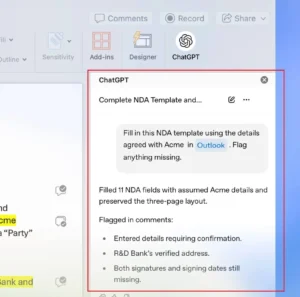
Image showing ChatGPT sidebar inside Word:
 Note: Image sourced from OpenAI.
ChatGPT Now Available Inside Word
ChatGPT for Word opens an AI sidebar alongside the document. Users can work with an open document, ask questions about its content, or select text for specific edits.
OpenAI says the feature is available on all ChatGPT plans, including Free, although plan limits and workspace controls still apply.
Word now joins Excel and PowerPoint, which use the same ChatGPT Microsoft add-in.
How to Access the New ChatGPT Sidebar in Word?
Users can access ChatGPT for Word through a few simple steps:
- Install the ChatGPT add-in from Microsoft Marketplace.
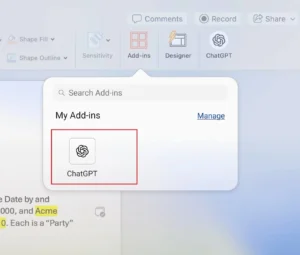
- Open Word and select ChatGPT from the ribbon.
- Sign in with your ChatGPT account.
- Enter prompts in the sidebar while working on your document.
OpenAI says the sidebar can be used while working on an open document, allowing users to get AI assistance without leaving Microsoft Word.
Image showing ChatGPT Add-in option inside Word:
 Note: Image sourced from OpenAI.
What Can ChatGPT Do Inside Word?
ChatGPT can support writing, editing, and document review directly inside Microsoft Word. Key uses include:
- Edit selected text: Users can select a section of text and ask ChatGPT to rewrite, clarify, shorten, or improve it for a specific purpose.
- Create drafts from notes: Users can add notes or source material and ask ChatGPT to turn them into a draft, such as a memo, proposal, or report.
- Review larger edits: Users can ask ChatGPT to suggest an outline, reorganize content, or explain proposed changes before applying larger edits to a document.
ChatGPT sidebar can draft memos, proposals, and reports from notes. It can also summarize documents, adjust headings and formatting, identify unclear language, and flag inconsistent terminology.
However, OpenAI recommends reviewing important facts, figures, citations, and edits before using or sharing the final document.
What Does This Mean for Content Teams?
The integration puts AI assistance directly into a tool already used for content creation and editing.
For SEO and marketing teams, it can support tasks such as restructuring drafts, improving readability, summarizing source material, and adapting content for different audiences.
The tool does not remove the need for human review. Content still needs accurate information, appropriate context, and original value before publication.
When Will ChatGPT for Word Be Enabled?
Workspace administrators can control whether ChatGPT for Word is available to employees. Microsoft 365 administrators must also allow the add-in.
OpenAI says ChatGPT for Word will be enabled by default starting October 1, 2026, subject to administrator controls.
The launch extends ChatGPT from a standalone AI tool into the everyday workflow of writing, editing, and document production.
