


To track keyword rankings over time, select relevant keywords, record their starting positions, and monitor changes using Google Search Console or a rank-tracking tool. Compare ranking movements with clicks, impressions, and CTR to identify opportunities and improve pages.
Why Tracking Keyword Rankings Is Important
Tracking keyword rankings over time helps you measure SEO progress, identify pages gaining or losing visibility, and find opportunities for improvement. Regular monitoring also reveals long-term trends that a single ranking check cannot show.
However, rankings alone do not measure SEO success. Compare keyword positions with clicks, impressions, click-through rate (CTR), and conversions to understand whether improved visibility is attracting relevant visitors and supporting your business goals.
How to Track Keyword Rankings Over Time: Step-by-Step
Follow these steps to select target keywords, establish a baseline, monitor ranking changes, and use the findings to improve your SEO performance.
1. Identify keywords based on search intent
Choose keywords relevant to your services, products, and topics. Check keyword search intent first: a page targeting the wrong intent may struggle even when it uses the exact phrase.
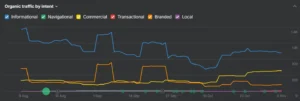
Group keywords by their dominant intent:
- Informational: Searchers want to learn something or find an answer.
Examples:
“how to track local keyword rankings”
“how to check keyword positions”
“how to improve keyword rankings”
- Commercial: Searchers are comparing products or services before making a decision.
Examples:
“best keyword rank tracking tools”
“Ahrefs vs Semrush”
“best SEO rank tracker.”
- Navigational: Searchers want to find a specific brand, website, or platform.
Example:
“Ahrefs rank tracker”
“Semrush Position Tracking”
“Google Search Console”
- Transactional: Searchers are ready to take an action or make a purchase.
Example:
“buy SEO rank tracking software”
“Semrush subscription plans”
“Ahrefs pricing.”
2. Create a list of target keywords
Build a focused list and connect each keyword to the page intended to rank for it. Organize terms into three groups:
- Primary Keywords: The main query a page is designed to target.
- Secondary Keywords: Closely related terms that support the same page.
- Long-tail Keywords: Specific searches that reveal a clearer need or use case.
Add a target URL beside each keyword to identify the page intended to rank and spot overlapping pages. Tag terms by topic, product, funnel stage, or location.
3. Record your starting keyword positions
Establish a baseline before making SEO changes. Record each keyword’s current position, target URL, tracking date, location, and device. This gives you a reference point for measuring future performance.
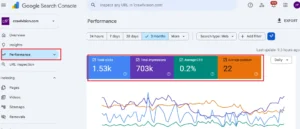
How to check keyword performance in Google Search Console:
- Log in to Google Search Console and select your website property.
- Open Performance > Search results.
- Enable these metrics:
- Total clicks
- Total impressions
- Average CTR
- Average position
- Open the Queries tab to see which search terms generate impressions and clicks.
- Switch to the Pages tab to identify the URLs receiving organic search traffic.
- Apply filters to review specific queries, pages, countries, or devices.
- Select a date range or compare two periods to identify performance changes.
- Click Export to download the data for further analysis.
Important: Google Search Console reports average position, not a fixed ranking that every searcher sees. Positions can vary by location, device, and search context.
4. Choose a keyword rank tracking tool
Choose a rank-tracking tool based on the number of keywords you manage, location accuracy, historical data, and competitor tracking features.
To get started, create a project, enter your website and target keywords, and select the search engine, location, language, and device. Keep these settings consistent when comparing ranking changes.
Google Search Console provides free search performance data. Ahrefs Rank Tracker and Semrush Position Tracking offer dedicated keyword monitoring and competitor analysis.
Note: Treat third-party rank tracking tools as estimates, not official Google data. Use Google Search Console to verify search performance.
5. Monitor keyword positions at regular intervals
Review rankings weekly to spot movement and monthly to identify longer-term trends. Daily checks can help investigate sudden drops, but small day-to-day changes do not always require action.
Keep your tracking settings consistent. Use the same location, device, search engine, and keyword list when comparing periods.
Record important changes, including content updates, technical fixes, and new backlinks. This context helps you understand whether an SEO change may have influenced ranking performance.
6. Compare keyword rankings over time & identify patterns
Compare current keyword positions with your baseline and previous reporting period. Look for consistent improvements, repeated declines, and keywords that have remained stable.
For example:
| Keyword | Previous rank | Current rank | Movement |
| SEO audit checklist | 18 | 8 | Up 10 |
| Keyword research tools | 6 | 12 | Down 6 |
| Technical SEO guide | 11 | 7 | Up 4 |
Note: It’s an Illustrative example. A smaller ranking number means a higher position.
A decline across several keywords targeting one URL may indicate a page-level issue. Changes across many pages may point to a wider technical problem or search update.
Also check whether the ranking URL has changed. Two pages targeting similar search intent may compete for the same queries. Compare impressions and clicks to understand whether ranking changes are affecting organic performance.
7. Optimize pages based on ranking performance
Use ranking data to decide which pages need attention. Match your next action to the position or performance pattern.
- Positions 4–10: Compare higher-ranking results. Fill content gaps, clarify intent, and strengthen internal links. A relevant internal linking strategy can help connect important pages.
- Positions 11–20: Improve content coverage, add useful examples, and review competing pages to identify missing information.
- Sudden ranking drops: Check affected queries, pages, countries, and devices in Search Console. Review indexing, technical errors, recent site changes, and confirmed Google updates.
- High impressions but low clicks: Review the page title, meta description, and relevance to the search query.
- Irrelevant keyword rankings: Refocus the content on the intended topic, search intent, and audience.
Record every optimization and its date. Review the page again in subsequent reports to understand whether the changes improved performance.
Best Tools & Extensions to Track Keyword Rankings
The right SEO tools and extensions depend on whether you need first-party search performance data, scheduled ranking checks, competitor comparisons, or quick browser-based SEO analysis.
| Tool | What It Does | Key Feature | Pricing Model |
| Google Search Console | Reports website performance in Google Search | Queries, clicks, impressions, CTR, and average position | Free |
| Ahrefs Rank Tracker | Monitors selected keyword positions | Historical ranking data and location-based tracking | Paid plans |
| Semrush Position Tracking | Tracks keyword positions and competitors | Scheduled updates and visibility reports | Paid plans |
| SEOquake | Provides browser-based SEO analysis | On-page checks and SERP metrics | Free extension |
| MSP SERP Counter | Checks keyword positions in Google search results | Quick SERP position checks for selected keywords | Free |
Use Google Search Console for your website’s reported search performance. Ahrefs and Semrush are useful for dedicated rank monitoring and competitor comparisons. SEOquake supports quick SEO checks but is not a substitute for historical rank tracking.
Compare current provider features and plan limits before choosing a paid tool.
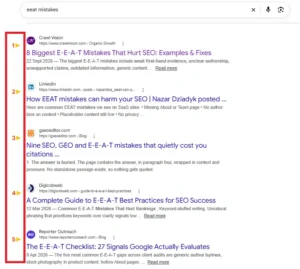
Image: MSP SERP Counter showing keyword position in Google search results.
How to Create a Keyword Ranking Report
A keyword ranking report organizes position changes and helps you identify which terms need attention. Create a spreadsheet in Google Sheets or Excel with one row per keyword.
Include the search intent, target URL, monthly positions, ranking movement, and recommended action.
Sample Keyword Ranking Report:
The following is an illustrative example.
| Keyword | Search Intent | Target URL | Oct Position | Nov Position | Dec Position | Change (Oct-Dec) | Action Required |
| keyword research tools | Commercial | /keyword-tools/ | 18 | 12 | 8 | +10 | Improve content and add comparisons |
| SEO audit checklist | Informational | /seo-audit-checklist/ | 7 | 5 | 4 | +3 | Strengthen internal links |
| local SEO services | Transactional | /local-seo/ | 11 | 14 | 19 | -8 | Review content and competitor pages |
| how to improve website rankings | Informational | /improve-rankings/ | 24 | 20 | 16 | +8 | Expand relevant content |
| technical SEO agency | Commercial | /technical-seo/ | 5 | 5 | 6 | -1 | Monitor performance |
| SEO consulting services | Transactional | /seo-consulting/ | 13 | 9 | 7 | +6 | Improve page relevance and authority |
Position changes are calculated as previous position minus current position. A positive number indicates improvement; a negative number indicates a decline.
How to use the report:
- Update rankings monthly: Record each keyword’s latest position in a new column.
- Compare ranking changes: Identify keywords that improved, declined, or remained stable.
- Review search performance: Add impressions, clicks, and CTR from Google Search Console to understand whether ranking changes are bringing more organic traffic.
- Assign optimization tasks: Note what needs attention, such as updating content, improving internal links, or reviewing search intent.
- Track progress: Keep previous months’ data instead of replacing it, so you can identify long-term ranking patterns.
Useful spreadsheet columns to include: Keywords, search intent, target URL, tracking date, previous position, current position, ranking change, impressions, clicks, CTR, and recommended action.
Note: This is a monthly ranking report sample. You can also create weekly or daily reports based on your needs and resources.
Conclusion
Tracking keyword rankings over time helps you understand which keywords are improving, which are losing visibility, and where your SEO strategy needs attention. Compare ranking changes with clicks, impressions, and organic traffic to identify what is working and prioritize the right improvements.
At Crawl Vision, our experience with 500+ SEO audits and website optimization shows how consistent monitoring can uncover opportunities for better search visibility and organic growth. Our approach focuses on turning ranking insights into practical SEO improvements.